FREE & OPEN SOURCE · NATIVE SWIFT

Tiny macOS menu-bar tools, built in pure native Swift.

MacGadgets lives quietly in your macOS menu bar to keep your Mac awake, flip your mouse scroll direction, and mount Android phones right in Finder—built natively in Swift with no extra drivers.
✓ 100% Free & Open Source✓ macOS Native (LSUIElement)✓ Launch at Login (SMAppService)
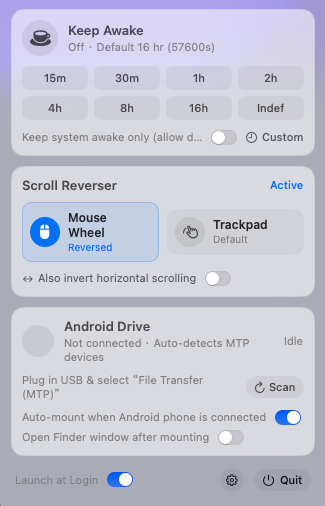
MacGadgets macOS menu-bar popover

Three focused utilities in one menu bar item

Built directly on macOS system frameworks—zero third-party kernel extensions.

1. Keep Awake

Direct native IOKit power assertions matching caffeinate -d -t without leaving orphan child processes.

  • One-click 16-hour (57,600s) preset or indefinite mode
  • Custom duration syntax: 90, 45m, 2h, 1h30m, 16:00:00
  • Live menu-bar countdown, +1h extend, and display-sleep toggle

2. Scroll Direction Flip

Intercepts scroll events via CoreGraphics CGEvent taps without altering macOS global Natural Scrolling.

  • Flip mouse wheel direction independently
  • Flip trackpad scroll direction independently
  • Optional horizontal scroll inversion

3. Android Disk in Finder

Mounts Android MTP phones as read/write Finder volumes using IOKit USB, a custom Swift MTP stack, and local user-space NFSv3.

  • Appears in Finder Locations sidebar via mDNS (.local)
  • Isolates macOS ._* and .DS_Store metadata in memory
  • Safe eject & one-click ptpcamerad release
BUILD FROM SOURCE · NO XCODE REQUIRED

Ready in one command

Only Apple Command Line Tools are required—no full Xcode installation, no Homebrew, and no macFUSE.

github.com/antipro/MacGadgets →
# Run core unit tests
make test
# Build release & package dist/MacGadgets.app
make app
# Install to /Applications/MacGadgets.app
make install